

Table of contents
Key takeaways
- TidyHQ lets members and event attendees choose Invoice as a payment option at checkout, alongside Credit Card, when an admin has switched it on for that membership level or paid ticket.
- A membership bought by invoice at checkout stays in Partial status until the invoice is paid, then becomes active, and auto-renew is turned off for memberships started this way.
- Event tickets bought by invoice are reserved but not issued until payment is received, and if the invoice passes its due date unpaid it is cancelled and the tickets go back on sale.
- Invoice due periods can be set between 1 and 60 days, and default to 2 days if left blank.
- Invoices an admin raises manually for event tickets keep the tickets valid even when overdue, which is how TidyHQ behaved before invoice-at-checkout.
Every registrar has had this email. “Hi, I’d like to renew but the club card is with our treasurer until Thursday. Can you send me an invoice?” Or the one from the parent whose employer pays for the kids’ sport, or the business sponsor who wants four tickets to the season launch dinner and pays everything through accounts. You raise the invoice by hand, you chase it, and you try to remember to switch the membership on once the money turns up.
As of February, members and attendees can pick an invoice themselves, at checkout, for membership sign-ups and for event tickets. It was one of the five most requested items on our feedback board.
How do I let members pay by invoice?
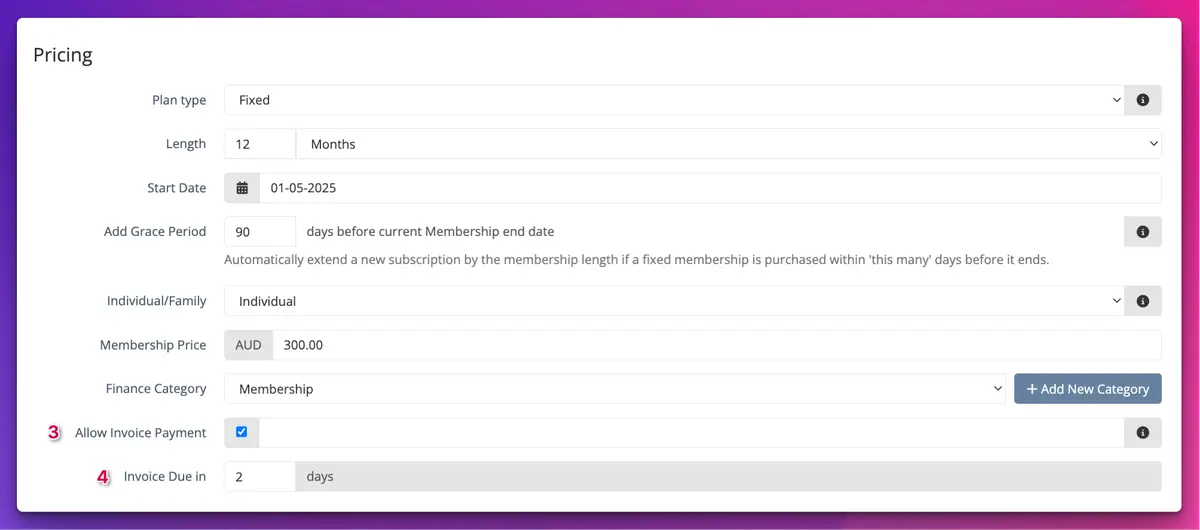
You switch it on per membership level, and members then see Invoice as a payment option next to Credit Card when they sign up. Levels you leave alone keep working exactly as before, card only.
That per-level control matters. You might be happy to invoice your Family and Life levels, where you know everyone, and keep the casual Social level on card so you’re not chasing $40 invoices from people you’ve never met.
What happens to a membership paid by invoice?
The membership goes into Partial status until the invoice is paid, the same as if you had raised the invoice yourself. The member gets the invoice by email straight away.
Once payment is recorded against the invoice, the membership becomes active. If a member tells you they’ve registered but they aren’t showing as financial yet, that almost always means the invoice is still unpaid.
One thing to know: auto-renew is turned off for memberships started through invoice checkout. That makes sense (there’s no card on file to charge next year), but it does mean these members will need to renew themselves, so they’re worth keeping an eye on when renewal season comes around.
Can people pay for event tickets by invoice?
Yes. You turn it on per paid ticket, and attendees who choose it get a confirmation page and an emailed invoice. Their booking is held, but the tickets themselves aren’t issued until the invoice is paid.
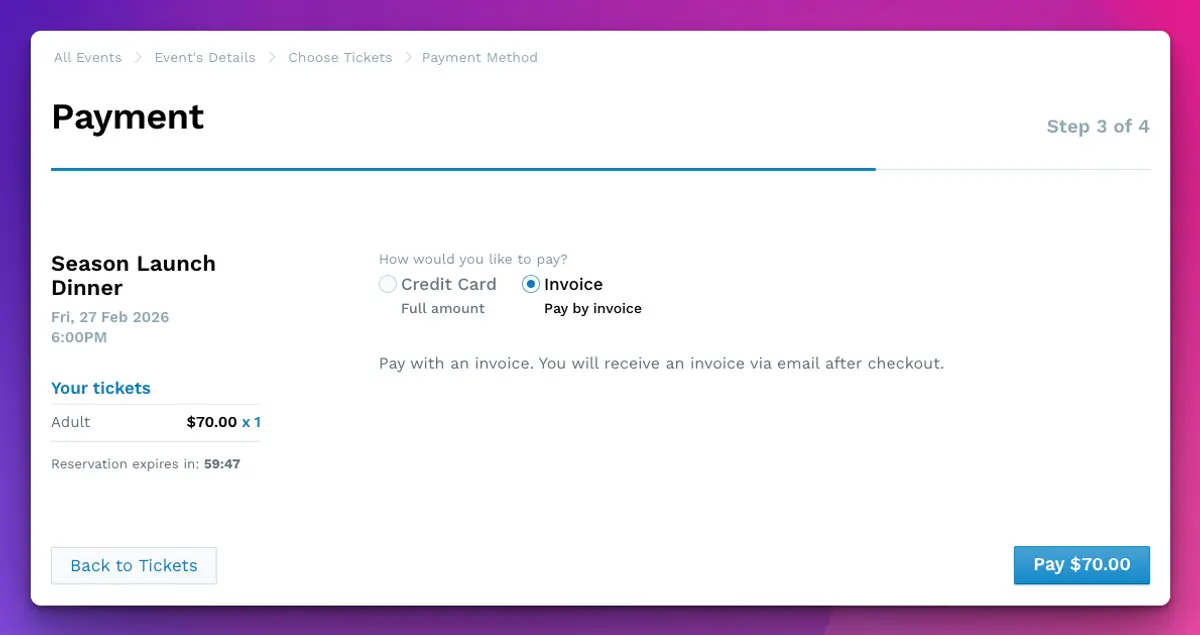
The invoice option only appears if every paid ticket in the cart allows it. So if your dinner has a sponsor table ticket with invoicing switched on and a general ticket without it, someone buying both will only see card. They can split it into two orders if they need to. When a cart mixes tickets with different due periods, the shortest one applies.
What happens if an event invoice isn’t paid?
TidyHQ sends a reminder about 24 hours before the due date. If the due date passes and the invoice is still unpaid, the invoice is cancelled and the tickets go back on sale for someone else.
This is the part that makes invoicing safe to offer. An unpaid invoice no longer sits on a seat at a sold-out trivia night while you wonder whether to ring them. The system lets it go.
Invoices you raise yourself as an admin, for tickets you’ve added by hand, behave as they always have: if they go overdue, the tickets stay valid. That’s deliberate. If you’ve issued the invoice, you’ve already decided you trust that person.
How to set it up
For a membership level:
- Go to Memberships, then Overview or Membership Levels.
- Click the name of the membership level to edit it.
- In the Pricing section, tick Allow Invoice Payment.
- Set Invoice Due in (the number of days after the invoice is issued).
- Save the membership level.
For event tickets:
- Go to Events and open the event.
- Open the settings for each paid ticket you want to include.
- Tick Allow Invoice Payment.
- Set Invoice Due Days.
- Save the event.
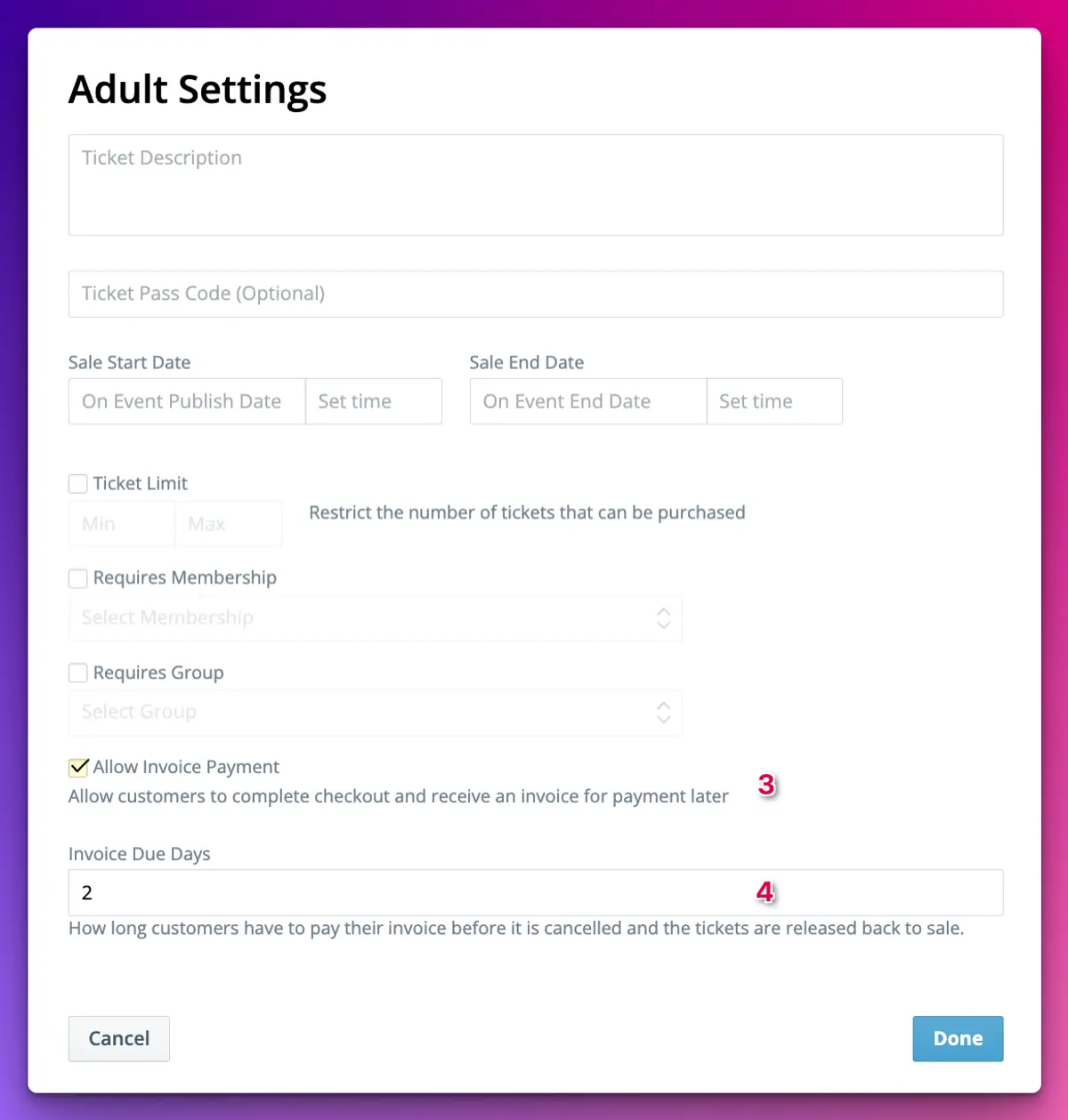
The due period can be anywhere from 1 to 60 days. If you leave it blank it defaults to 2 days, which is short, so think about what suits you. The full steps and troubleshooting are in the help centre articles for memberships and event tickets.
A few settings worth pairing with it
If you’d rather only offer invoices to people you know, combine Allow Invoice Payment with Requires Membership, Requires Group or a Pass Code on the same ticket. Invoicing for your financial members, card for everyone else.
For events that sell out, set a Sale End Date that leaves room after the invoice due period. If an invoice lapses two days before the event, released tickets can still be picked up by last-minute buyers instead of going to waste.
What it doesn’t do
Invoice checkout doesn’t take the payment for you. Online card payments still run through Stripe, and when a member pays their invoice some other way, someone still needs to record that payment in TidyHQ before the membership goes active or the tickets are sent. It also doesn’t change anything about the invoices you already raise by hand from Finances.
It’s a small change in the scheme of things. But it moves the “can I pay by invoice?” conversation out of your inbox and into the checkout, where the member can answer it themselves. More on how the rest of memberships and events work is on the product pages.
Header image: Renewal Suprematist square by Kazimir Malevich, via WikiArt

Don't miss these

Sharing policies and files from a peak body to every affiliated club
Peak bodies can share Storage folders with their affiliated clubs, read-only. Folders can now hold links to documents hosted elsewhere, and clubs see shared folders in their sidebar even if they have never added the Storage app.

The new Xero integration splits Stripe payouts by category
Our rebuilt Xero integration is now self-serve on the Pro plan. Each Stripe payout lands in Xero already split across your accounts, so the treasurer can see how much was memberships and how much was the trivia night.

Filter and sort your club's transactions, for the treasurer
Transactions in Finances now has proper filters and sorting. Find every unreconciled canteen deposit, one family's payments or last month's refunds, and export exactly that list to CSV.