

Table of contents
Key takeaways
- TidyHQ two-way SMS began an early-access rollout in June 2026, starting with selected TidyConnect customers, and is not yet available to every organisation.
- Two-way SMS in TidyHQ gives an organisation its own dedicated phone number, provisioned through Twilio, so members can reply to texts and admins can answer from an SMS Conversations inbox.
- During early access, TidyHQ two-way SMS is supported for organisations in Australia and the United Kingdom only, including the regulatory registration each country requires.
- When a member texts STOP to a TidyHQ club number they are opted out of that organisation's SMS and sent a confirmation, and texting START opts them back in.
- Messages and replies sent through TidyHQ two-way SMS use the organisation's SMS credit balance, the same as standard SMS broadcasts.
Friday, 6.40pm, rain coming in sideways. The ground manager rings to say the fields are closed, and the secretary sends a text to 200 families. Within ten minutes the replies start. “Is the under-10s game cancelled too?” “What about Sunday?” “Can I still pick up the uniform order?” Every one of them went to a number that couldn’t receive a reply, so nobody at the club ever saw them. The parents concluded, fairly, that nobody was listening.
Two-way SMS fixes that by giving your organisation its own phone number. Members reply to it, and you read and answer those replies in TidyHQ. It started rolling out in June as early access, to a small group of organisations first.
Is two-way SMS available to everyone?
No, not yet. Two-way SMS is in early access, starting with selected TidyConnect customers. During early access it is switched on organisation by organisation, and only for organisations based in Australia or the United Kingdom. If you’re not in the early-access group you won’t see it in your admin, and your existing SMS sending works exactly as it did.
We’d like to make it more widely available soon. We’re not putting a date on that, because early access is where we find out what needs fixing.
Everything below describes how it works for organisations taking part. Screens and details may change before a wider release.
How is it different from the SMS we already send?
Standard TidyHQ SMS goes out under a sender name rather than a phone number, and a sender name can’t receive replies. It’s fine for “Training is on at 5pm” and useless for anything that needs an answer.
With two-way SMS your organisation rents its own dedicated number. Broadcasts go out from that number, so when a member replies it lands in an inbox in TidyHQ, tied back to that member’s contact record. You can reply from the same screen, and the conversation carries on like any other text thread.
Where do replies go?
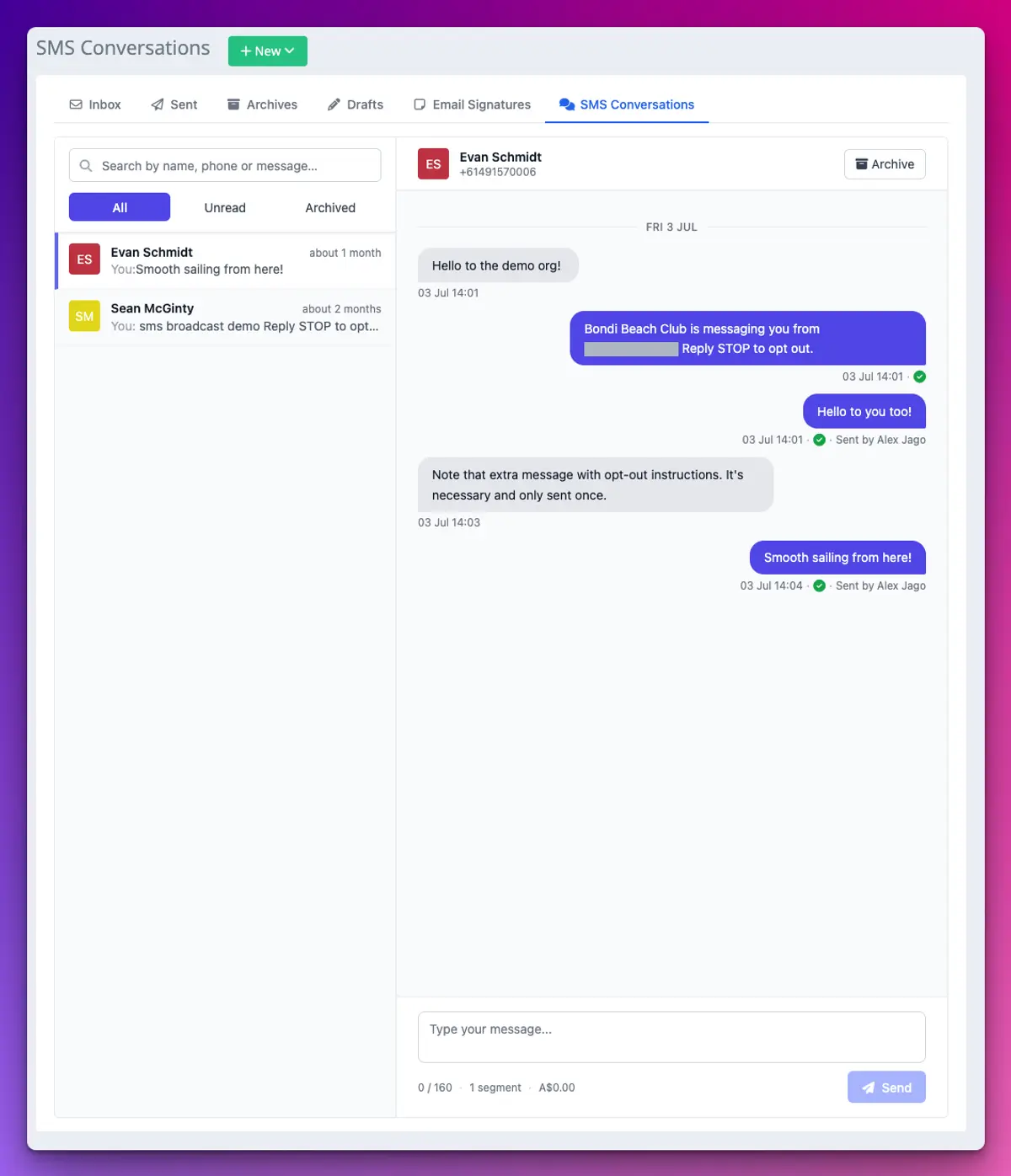
Replies go to Communicate > SMS Conversations. Conversations are listed on the left with unread ones marked, and the thread you pick opens on the right with a reply box at the bottom. If a reply comes from a number TidyHQ can’t match to a contact, you can link the conversation to the right person, which pulls up their membership and recent activity alongside.
What happens when a member texts STOP?
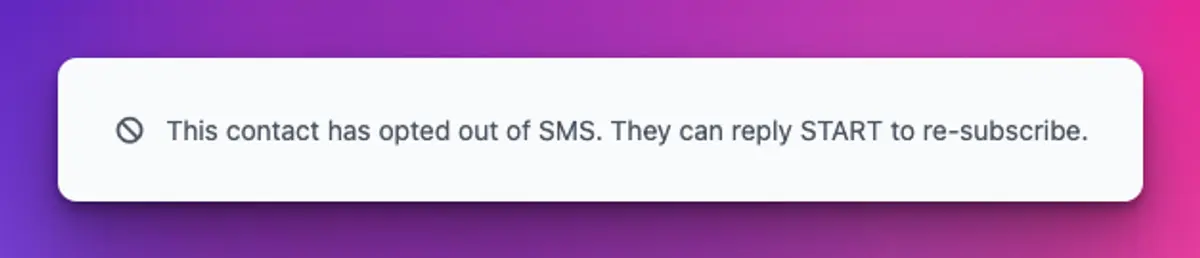
They’re opted out. If a member replies STOP (or UNSUBSCRIBE, CANCEL, END, QUIT or STOPALL), TidyHQ records the opt-out against their contact and texts back to confirm they’ve been unsubscribed from your organisation’s messages. The conversation shows a banner, and replying to that person is switched off. If they change their mind, they text START and they’re back in.
You can’t override an opt-out on someone’s behalf, and that’s on purpose. It’s a compliance safeguard, and it protects your number as much as your members.
To help you stay on the right side of the rules, the first message in a brand new conversation includes a short line saying who it’s from and how to opt out. You don’t have to remember to add it.
What does it cost?
Two-way messages draw from the same SMS credit balance as your broadcasts. If the balance runs out, TidyHQ tells you before anything is sent rather than failing quietly. The dedicated number is rented and billed to your organisation separately. We’re not listing prices here while the programme is in early access. Pricing has our current plans.
How to set it up
For organisations in the early-access group:
- We switch two-way SMS on for your organisation.
- In your organisation’s communication settings, choose and rent your dedicated number.
- Complete the regulatory registration for your country. Australia and the UK both require business details to be registered before a number can send, and TidyHQ collects them as part of setup.
- Once the number is active, send a broadcast from it, and watch SMS Conversations for replies.
The support article on replying to contacts by text has the current steps.
What it doesn’t do yet
It isn’t available outside Australia and the UK. Each organisation has one dedicated number. It doesn’t replace email for anything long, and it isn’t a group chat: replies come back to the club, not to everyone on the broadcast. And it’s early access, so expect some rough edges while we work through them with the first organisations.
More on how TidyHQ handles communications, and progress updates will turn up in the changelog.
Header image: Flying to earth from a distance by El Lissitzky, via WikiArt

Don't miss these

Sharing policies and files from a peak body to every affiliated club
Peak bodies can share Storage folders with their affiliated clubs, read-only. Folders can now hold links to documents hosted elsewhere, and clubs see shared folders in their sidebar even if they have never added the Storage app.

The new Xero integration splits Stripe payouts by category
Our rebuilt Xero integration is now self-serve on the Pro plan. Each Stripe payout lands in Xero already split across your accounts, so the treasurer can see how much was memberships and how much was the trivia night.

Filter and sort your club's transactions, for the treasurer
Transactions in Finances now has proper filters and sorting. Find every unreconciled canteen deposit, one family's payments or last month's refunds, and export exactly that list to CSV.