

Table of contents
Key takeaways
- Since May 2026, TidyHQ membership levels have an Allow Multiple? setting that, when unticked, stops a member registering a second membership of the same level while they hold an active, partial or renewable one.
- When Allow Multiple is off and a member tries to join again, TidyHQ shows them a message pointing them to renew their existing membership if renewals are open, or telling them multiple memberships of that level are not allowed.
- Allow Multiple is ticked by default, and membership levels with pricing variations always allow multiple memberships.
- The Allow Multiple restriction does not stop a member moving to a different level, and family memberships are checked by matching the full roster of adults and children.
- Since May 2026, TidyHQ administrators can add Profile Photo as an optional or required field on a membership registration form without creating a custom field.
It’s the second week of renewals. A member gets the reminder email, can’t find it again two days later, goes to the club website and clicks “Join”. Now they hold two Senior memberships, they’ve paid twice, and the registrar gets to spend Sunday night working out which one to cancel and how to refund the other. Multiply by six and you have a proper evening.
In May we added a setting that stops this at the door. You can now limit a membership level to one at a time, so a member who already has one is sent to renew it instead of buying another. In the same release, Profile Photo became something you can ask for on the signup form.
How do I stop members registering the same membership twice?
Untick Allow Multiple? in that membership level’s settings. From then on, a member who already holds an active, partial or renewal-eligible membership of that level can’t register for another one.
If they try, they get a message instead of a payment screen. When renewals are open, the message points them to renew their existing membership. When they aren’t, it tells them that multiple memberships of this type aren’t permitted. Either way you don’t end up with a duplicate to clean up.
The setting is per level, and it is ticked by default, so nothing changes until you choose to turn it off. That’s deliberate. TidyHQ has always let a contact hold more than one membership, and some organisations rely on it.
How to set it up
- Go to Memberships in the left sidebar and click the name of the membership level.
- Scroll down to the Renewals section.
- Untick Allow Multiple?.
- Save the level.
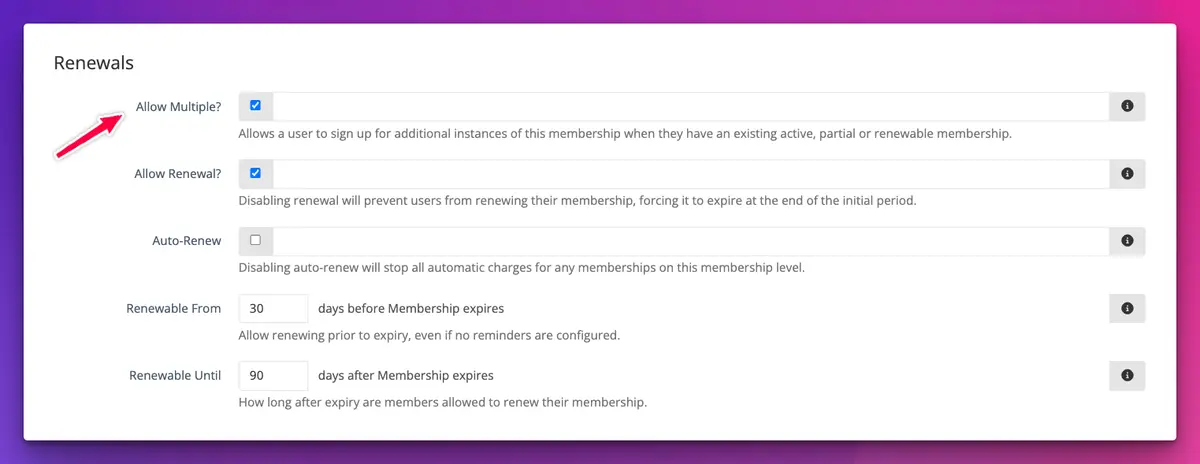
The support article on limiting members to one membership at a time has the detail, including the renewal-window interaction below.
What should I check before turning it off?
Look at your renewal settings on the same screen. If you’ve disabled renewals, or set a narrow Renewable From window, a member with an active membership may be unable to renew yet and unable to join again. They’ll have nothing to click until their membership expires or the window opens. That might be exactly what you want. It might also produce an email to the secretary asking why the website is broken. Worth thinking through before the season opens.
What doesn’t it prevent?
A few things, on purpose:
- Members can still register for a different level. Someone moving from Adult to Concession isn’t blocked.
- Membership levels with pricing variations always allow multiple memberships, whatever the checkbox says.
- Family memberships are checked as a roster, matching each adult and child. If the family has changed (a new sibling, or a child who is now an adult), it counts as a different membership and goes through.
It’s a guard against the common mistake, not a lock on every door.
Can I collect profile photos when people sign up?
Yes. Profile Photo is now one of the fields you can add to a membership registration form, so you no longer need a custom file field to collect a head shot. The photo goes straight onto the member’s contact profile, where it belongs.
To add it, open the membership level, find Membership Field Options, choose Profile Photo from the Add Field Option list, and mark it optional or required like any other field. For family levels, adults and children have their own field lists, so you can ask for photos from one group and not the other.
Only switch it on where it makes sense. A photo is personal information, and for junior members especially your club’s privacy and child safety policies should decide whether you collect one at all.
Why would a club want member photos?
Mostly for identification. If you use Apple or Google Wallet digital membership cards, the card’s thumbnail uses the member’s profile photo by default when thumbnails are turned on, so the volunteer on the gate can match the card to the face. It also helps a new registrar put names to faces at the first training night.
Both changes are small. Neither needs anyone on the committee to learn anything new. More on memberships in TidyHQ and contact profiles, or see the rest of May’s updates in the changelog.
Header image: Static 2 by Bridget Riley, via WikiArt

Don't miss these

Sharing policies and files from a peak body to every affiliated club
Peak bodies can share Storage folders with their affiliated clubs, read-only. Folders can now hold links to documents hosted elsewhere, and clubs see shared folders in their sidebar even if they have never added the Storage app.

The new Xero integration splits Stripe payouts by category
Our rebuilt Xero integration is now self-serve on the Pro plan. Each Stripe payout lands in Xero already split across your accounts, so the treasurer can see how much was memberships and how much was the trivia night.

Filter and sort your club's transactions, for the treasurer
Transactions in Finances now has proper filters and sorting. Find every unreconciled canteen deposit, one family's payments or last month's refunds, and export exactly that list to CSV.