

Table of contents
Key takeaways
- In August 2026 TidyHQ refreshed its contact profile into sections for membership context, details and a separate Notes and activity column.
- On a TidyHQ contact profile, holding Shift and pressing A, C, E, G, M or N adds an attachment, links a related contact, edits details, edits groups, adds a membership or adds a note, and Shift with the up or down arrow moves between sections.
- TidyHQ contact notes support rich text, images and @mentions of administrators and roles, and anyone mentioned is notified in the app and by email.
- In the refreshed TidyHQ Contacts table, Advanced Filters is now called Filters and the Displayed Fields button is now called Columns, and a filtered list can be saved as a Smart Group.
- The TidyHQ Groups list, each group's contact table and the Possible Duplicates screen were also refreshed in late August 2026.
A parent rings the club on a Tuesday night. Their daughter’s membership says expired, they’re sure they paid, and could someone please sort it before Saturday’s game. The registrar opens the contact, then scrolls to find the membership, then scrolls further to find the note the treasurer left three weeks ago, then opens another tab to check the groups. Four screens to answer one question.
In August we rebuilt the contact profile to keep that kind of answer on one screen. Notes have their own column, there are keyboard shortcuts for the first time, and the Contacts table, Groups and Possible Duplicates screen got the same treatment a fortnight later.

What does the new contact profile look like?
It’s laid out in three parts. On the left is the person’s current membership and when it renews, with a menu of sections underneath: Overview, Memberships, Groups, Related Contacts, Attachments, Account and permissions, and Finances. The section you pick fills the middle. On the right is Notes and activity, so the history of the person stays in view while you work on their details.
On a wide screen the notes sit in their own column. On a smaller laptop they slide in as a drawer from the right-hand edge, and on a phone the profile view comes first. Nothing has been taken away; it’s the same information, arranged so a busy record doesn’t feel crowded.
What keyboard shortcuts does TidyHQ have?
Hold Shift on a contact’s profile and a small helper appears at the bottom of the screen listing what you can press:
- Shift + ↑ or ↓ moves between sections
- Shift + A adds an attachment
- Shift + C links a related contact
- Shift + E edits details
- Shift + G edits groups
- Shift + M adds a new membership
- Shift + N adds a new note
And when you’re writing a note, Ctrl + Enter (or Cmd + Enter on a Mac) saves it. If you process forty renewals on a Sunday, not reaching for the mouse forty times adds up.
How do contact notes work now?
Notes are rich text. You can use bold, lists and the like, attach an image or video, and @mention people. The mention list includes your organisation’s administrators and roles, so you can write “@Registrar can you check this family’s payment” without knowing who took on the role at the last AGM.
Whoever you mention gets an in-app notification and an email saying you mentioned them in a note on that contact, with the note quoted. It saves the separate “have a look at Jess’s record” email, which was never going to be read before Saturday anyway.
Notes are internal. They’re for the committee, not the member. The composer also has Email and SMS tabs (SMS appears when the contact has a mobile number) to jump into writing to the person without leaving the profile.
What changed in the Contacts table?
The Contacts table has a visual refresh, and two buttons have plainer names. Advanced Filters is now just Filters, and Displayed Fields is now Columns. Filters work as they did: add conditions, apply them, and if it’s a list you’ll want again, click Save as Smart Group. Columns are grouped into sections (Default, Membership, Custom and so on) and searchable, which helps when you have sixty custom fields from the last three registrars.
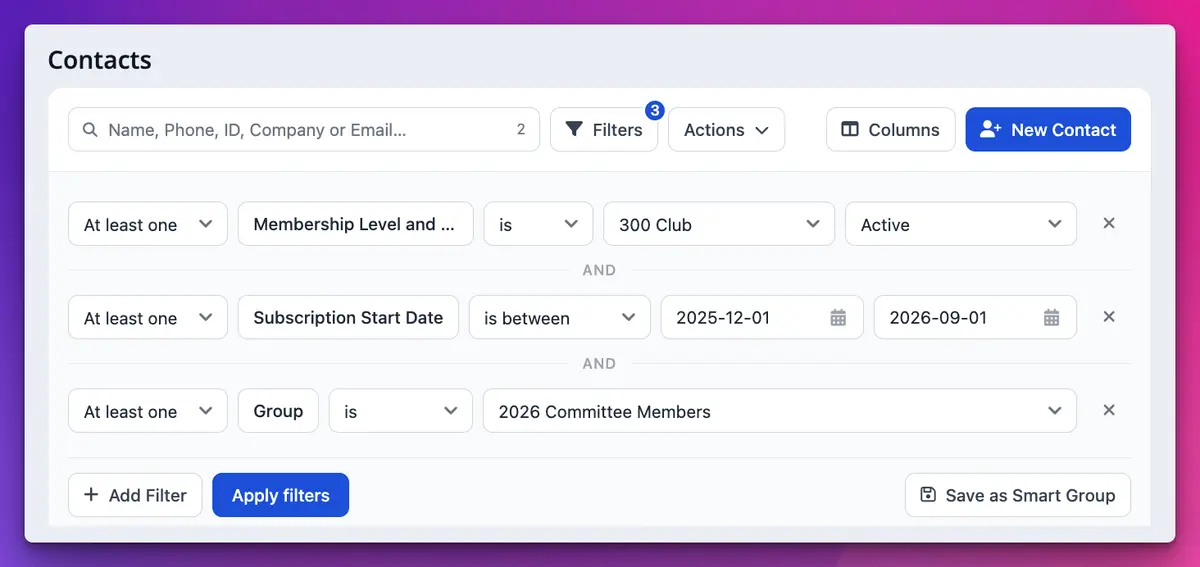
Smart Groups also update promptly when a member’s details change now. Previously they could take up to 24 hours to catch up.
What about Groups and Possible Duplicates?
Groups have the same refresh, both the list of groups and each group’s contact table. The Possible Duplicates screen was refreshed too. It still works the same way: go to Contacts > Possible Duplicates, choose which details to match on (full name, email, contact ID, phone number or company), then merge or ignore each set. It only makes suggestions; nothing merges until you say so.
How to get started
There’s nothing to turn on. Next time you’re in TidyHQ:
- Open any contact and hold Shift to see the shortcuts.
- Leave a note and try an @mention of a role.
- On the Contacts table, open Columns and pick the fields you actually use.
- Visit Contacts > Possible Duplicates and clear a few before renewals.
Be careful with that last one. Merging can’t be undone, so read the support article on handling duplicate contacts before you merge a whole list at once.
Anything missing?
A couple of limits. If a contact has been shared to you by another organisation, their notes and activity are managed by that organisation, so you can’t add a note there (you can still email them). And the Possible Duplicates tool still depends on you choosing sensible match criteria; tick every box and the same person can turn up in several lists.
More on contacts in TidyHQ and memberships, or the full list of August changes in the changelog.
Header image: Birth by Victor Vasarely, via WikiArt

Don't miss these

Sharing policies and files from a peak body to every affiliated club
Peak bodies can share Storage folders with their affiliated clubs, read-only. Folders can now hold links to documents hosted elsewhere, and clubs see shared folders in their sidebar even if they have never added the Storage app.

The new Xero integration splits Stripe payouts by category
Our rebuilt Xero integration is now self-serve on the Pro plan. Each Stripe payout lands in Xero already split across your accounts, so the treasurer can see how much was memberships and how much was the trivia night.

Filter and sort your club's transactions, for the treasurer
Transactions in Finances now has proper filters and sorting. Find every unreconciled canteen deposit, one family's payments or last month's refunds, and export exactly that list to CSV.