

Table of contents
Key takeaways
- TidyHQ can generate a downloadable QR code for any published event and for any meeting that has been made public.
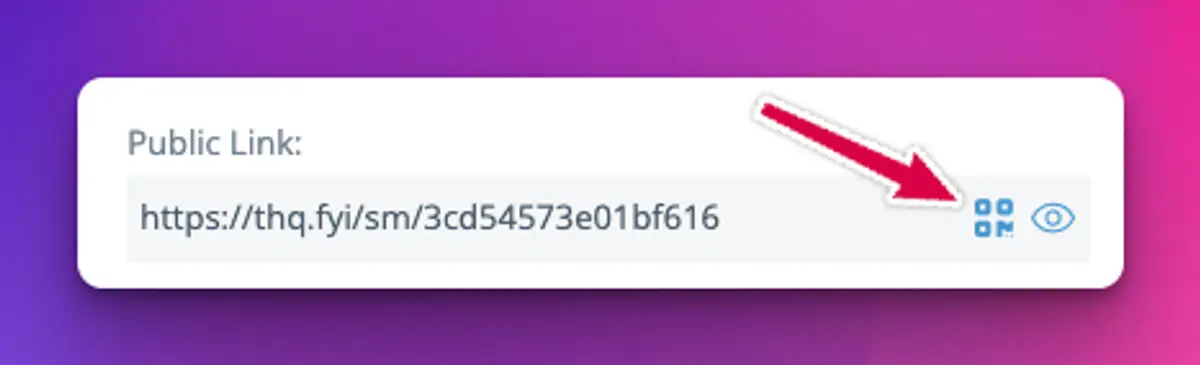
- The QR code button sits next to the Public Link, in the Share Event section of an event and beside the Public Link on a public meeting.
- The QR code downloads as a PNG image file and opens the same short public link that TidyHQ shows for that event or meeting.
- Because the QR code points to the event or meeting link rather than to fixed details, editing the date, venue or description does not break a code that has already been printed.
There’s a laminated A4 sheet on every clubhouse door in the country advertising the presentation night. It has the date, the price, and a link that looks like someone sneezed on a keyboard. Nobody types it in. They take a photo of it, mean to do something later, and then ask the secretary on the Thursday before whether there are any tickets left.
Since February, every published event and every public meeting in TidyHQ has a QR code. Download it, drop it on the poster, and anyone with a phone camera can open the page from the car park.
Where do I find the QR code for an event?
It’s in the Share Event section of the event, right next to the Public Link. Click the QR code button and TidyHQ downloads a PNG image, named after the event, that you can put straight into a flyer, a newsletter or a slide.
The event has to be published first. Until then there’s no public page for the code to point to, so the share options don’t show.
Can I get a QR code for a meeting or AGM?
Yes, once the meeting is public. When you make a meeting public, a Public Link appears on the meeting’s page, and the QR code button sits next to it.
This is handy for the AGM. Put the code on the notice you pin up in the clubhouse, or on the first slide on the night, and members can pull up the agenda on their phone instead of you printing forty copies.
One caution from the help centre that applies here too: making a meeting public makes the whole meeting content visible to anyone with the link, members and non-members alike. If your agenda has the treasurer’s notes on a sponsor dispute in it, keep that meeting private and share a cleaned-up version another way. The steps for making a meeting public are in the help centre.
What happens if I change the event after printing the QR code?
Nothing breaks. The code opens the event’s short public link, and that link points to the event itself, not to a snapshot of it. Move the start time, change the venue because the ground’s waterlogged, add a ticket type: the printed code still opens the current page.
What it won’t do is follow you to a different event. If you duplicate last year’s trivia night for this year, that’s a new event with its own link and its own code, so download a fresh one.
How to set it up
For an event:
- Go to Events and open the event.
- Make sure it’s published.
- Go to Share Event and find the Public Link.
- Click the QR code button next to the link to download the image.
For a meeting:
- Open the meeting in Meetings.
- Make it public if it isn’t already.
- Next to the Public Link, click the QR code button to download the image.
Where do clubs actually use these?
Anywhere people are standing around with a phone and not much to do. A few that come up a lot:
The canteen window, with a code for the end-of-season function. The back of the junior footy registration day handout, pointing at the parent information night. A slide during the break at presentation night, for next month’s working bee. The club newsletter, where it saves the reader copying a link from a PDF. A code on the gate for the committee meeting that’s open to members.
Print it reasonably large if it’s going on a wall. A code the size of a postage stamp, stuck to a fence three metres from the path, doesn’t get scanned.
Limits worth knowing
This QR code is a link to the event or meeting page. It isn’t a ticket, and it doesn’t check anyone in. Attendees’ tickets have their own QR codes, one per ticket, in the PDF that comes with their confirmation email, and those are a different thing.
The download is a plain black and white PNG. There’s no logo in the middle and no colour options. For most posters that’s what you want anyway, because plain codes scan more reliably in bad light.
If you want people to find the event without a poster, the same public link works in your emails from Communications and on your club’s web pages. The rest of what Events can do is on the product page.
Header image: Composition III with Blue, Yellow and White by Piet Mondrian, via WikiArt

Don't miss these

Sharing policies and files from a peak body to every affiliated club
Peak bodies can share Storage folders with their affiliated clubs, read-only. Folders can now hold links to documents hosted elsewhere, and clubs see shared folders in their sidebar even if they have never added the Storage app.

The new Xero integration splits Stripe payouts by category
Our rebuilt Xero integration is now self-serve on the Pro plan. Each Stripe payout lands in Xero already split across your accounts, so the treasurer can see how much was memberships and how much was the trivia night.

Filter and sort your club's transactions, for the treasurer
Transactions in Finances now has proper filters and sorting. Find every unreconciled canteen deposit, one family's payments or last month's refunds, and export exactly that list to CSV.