

Table of contents
Key takeaways
- TidyHQ events have a Visible To setting with two options, Public and Groups, so an event can be shown only to contacts in one or more selected groups.
- Contacts in the selected groups must be logged in to see a group-only event, and anyone else who follows the link sees a page-not-found message instead of the event.
- Event visibility is separate from ticket restrictions, so an event can be visible to one group while individual tickets still require a membership, a group or a pass code.
- Private events were one of the most requested items on the TidyHQ feedback board and shipped in March 2026.
The under-12s end-of-season party is at the coach’s house. You’d like the parents to have the address. You’d rather the rest of the internet didn’t. Until now, the choice was to publish the event publicly with the address in it, or leave the address out and field twenty-two “where is it again?” messages on the Friday.
In March we shipped private events. An event can now be visible to the public, as before, or only to the groups you pick.
How do I make an event private in TidyHQ?
Open the event’s settings and change Visible To from Public to Groups, then choose one or more groups. Only contacts in those groups will be able to see the event, and they’ll need to be logged in to do it.
It works the same way as the Visible To setting you might already use on membership levels, web pages and shop items, so if you’ve restricted a members-only page before, this will feel familiar.
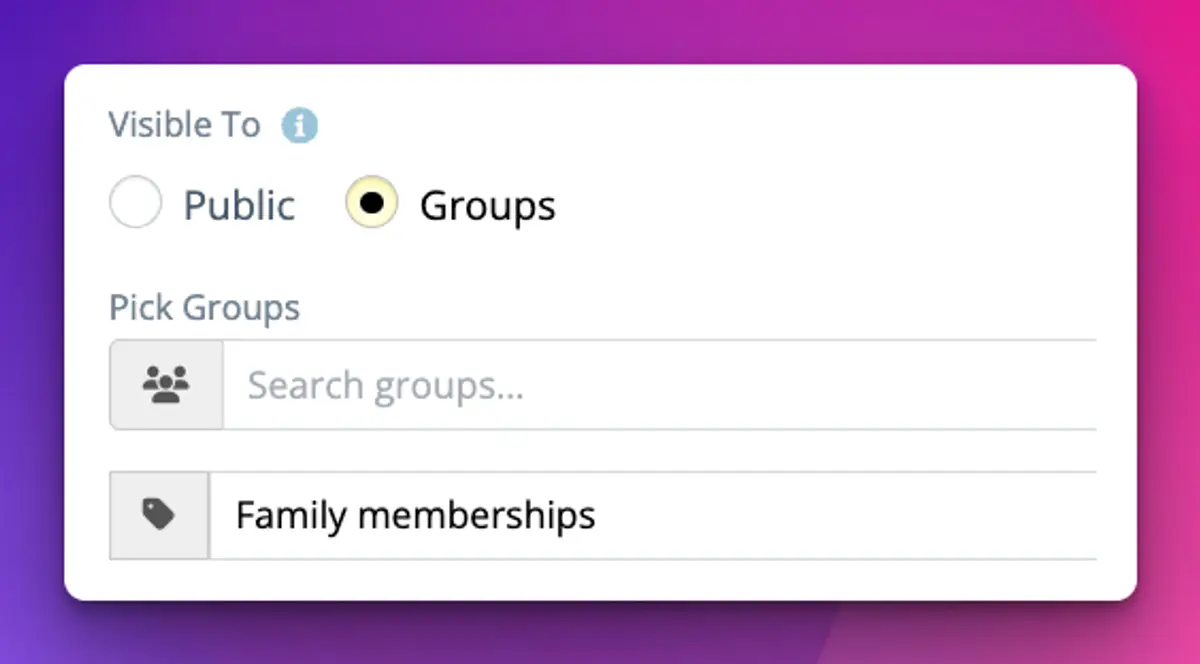
Who can see a group-only event?
Logged-in contacts in any of the groups you selected can see it, and so can admins who manage events. Nobody else can.
For everyone else, the event doesn’t turn up in your public events list, and if someone follows a forwarded link they get a page-not-found message rather than the event. That’s the point. The location, the organiser’s mobile number and the price stay with the people they were meant for.
What if a member can’t see the event?
Check two things. First, that they’re logged in, because a group-only event looks like it doesn’t exist until they are. Second, that they’re actually in one of the groups you picked.
The first one will catch people out. A member who taps the link in your email while logged out will see page not found, not a login prompt. It helps to say “log in first” in the email itself. The new magic-link sign-in, which also shipped in March, makes that less of a chore for members who don’t remember a password.
Is this the same as members-only tickets?
No. They’re two separate controls, and you can use either or both. Visibility decides who can see the event at all. Ticket restrictions decide who can buy a particular ticket, using Requires Membership, Requires Group or a Pass Code.
A few combinations that make sense:
A public event with a members-only ticket, so the whole town sees the fun run but only financial members get the cheaper entry. A group-only event with no ticket restrictions, like a committee dinner visible to the Committee group where everyone who can see it can book. Or a group-only event with a pass code on one ticket, for a volunteer thank-you where partners are welcome but you’d like to control the numbers.
The help centre article on controlling who can see and attend your events covers both settings side by side.
How to set it up
- If the group you need doesn’t exist yet, create it first under Contacts, then Groups.
- Go to Events and open the event.
- In the event’s settings, find Visible To.
- Choose Groups.
- Under Pick Groups, search for and add each group that should see the event.
- Save the event.
To make it public again later, switch Visible To back to Public.
Good uses for it
Anything where the details are sensitive or the audience is small. The junior camp where the venue and the coach’s contact details shouldn’t be public. The life members’ lunch. A working bee on someone’s private property. A selection trial for a representative squad, where the list of invited players is the group. A committee planning day that has no business being on the public calendar next to the sausage sizzle.
It also tidies up your public events page. Visitors thinking about joining see the things they could come to, not a list of internal meetings they can’t.
Limits and caveats
Visibility works through groups, so it’s only as accurate as your groups are. If the Under 12 Parents group still has last season’s families in it, they’ll see this season’s party. Worth a quick look at the group before you publish.
It also can’t stop someone who can see the event from sharing what’s on it. A parent can screenshot the address and post it in the wider club chat. This keeps details off the public web, which is what most clubs need, but it isn’t a secret-keeping machine.
And a private event is still a normal event in every other way: tickets, attendee questions and the event’s contact group all work as usual. Groups themselves live in Contacts, and the rest of Events is on the product page.
Header image: Vertical Composition with Blue and White by Piet Mondrian, via WikiArt

Don't miss these

Sharing policies and files from a peak body to every affiliated club
Peak bodies can share Storage folders with their affiliated clubs, read-only. Folders can now hold links to documents hosted elsewhere, and clubs see shared folders in their sidebar even if they have never added the Storage app.

The new Xero integration splits Stripe payouts by category
Our rebuilt Xero integration is now self-serve on the Pro plan. Each Stripe payout lands in Xero already split across your accounts, so the treasurer can see how much was memberships and how much was the trivia night.

Filter and sort your club's transactions, for the treasurer
Transactions in Finances now has proper filters and sorting. Find every unreconciled canteen deposit, one family's payments or last month's refunds, and export exactly that list to CSV.