
Magic link sign-in: one tap from the email and your members are in

Table of contents
Key takeaways
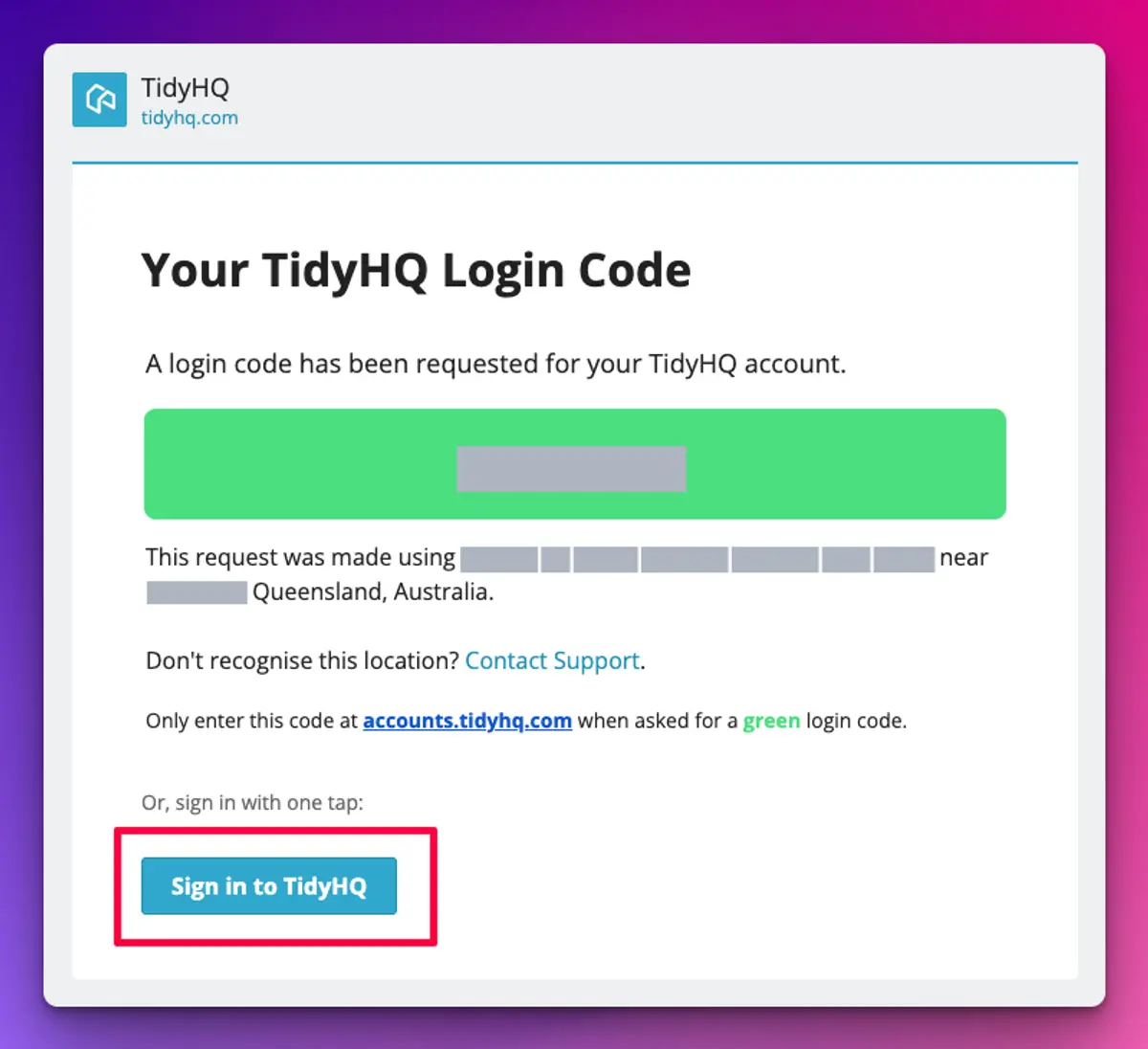
- Since March 2026, the TidyHQ sign-in code email includes a "Sign in to TidyHQ" button that signs the person in with one tap, as well as the one-time code.
- TidyHQ magic-link sign-in works the same way for members and administrators, because both use the same TidyHQ account sign-in.
- TidyHQ's magic link keeps the original sign-in session, which fixes a problem where Android Gmail and similar apps opened links in an in-app browser and lost the session the code belonged to.
- Each TidyHQ sign-in email shows the device and approximate location the request came from, and the code is colour-coded so it can be matched to the sign-in screen that asked for it.
- Members who prefer can still type the one-time code from the same email, or sign in with a passkey instead.
Renewals open, and by Tuesday the registrar has had four texts from members who “can’t get in”. Each time it is the same story. They asked for a sign-in code, opened the email on their phone, tapped something, ended up in a strange little browser inside Gmail, closed it to go and find the code, and came back to a screen that said the session had expired. Then they gave up and texted her.
Since March 2026, TidyHQ’s sign-in email has a Sign in to TidyHQ button. Tap it and you are signed in. No code to copy across, no switching between apps, no text message to the registrar.
What is a magic link?
A magic link is a sign-in button in an email that signs you in when you tap it. TidyHQ adds one to the same email that carries your one-time sign-in code, so you get both: tap the button, or type the code if you prefer.
Some members will never set up a passkey and would rather not have a password at all, and no amount of encouragement from the committee will change that. This is for them. They put in their email, check their inbox, tap the button.
Why did members keep getting “session expired”?
It was the in-app browser. On Android Gmail and a few other apps, tapping a link opens it in a small browser inside the app rather than in Chrome. To read the code, members had to close that browser, and closing it threw away the sign-in session the code belonged to. So by the time they typed the code, it had nothing to attach to.
The magic link keeps that context. Tapping the button carries the original sign-in request with it, so the member lands signed in, whichever app opened the link.
Does this work for admins as well as members?
Yes. Members and administrators sign in to the same TidyHQ account, so the treasurer checking payments on her phone at the ground gets the same button as a parent renewing their child’s membership.
How to set it up
There is nothing to switch on. It is part of the sign-in email for every organisation. For the person signing in:
- Go to your club’s TidyHQ page and click Log In, then enter your email.
- If TidyHQ sends a code straight away, open the email. If you see other options first, click Try Another Way and choose the email code.
- Tap Sign in to TidyHQ in the email. Or type the code into the sign-in screen, if you are reading the email on a different device.
The TidyHQ help article on getting back into your account walks through each option, including passkeys.
Is a magic link safe?
It is as safe as the inbox it arrives in, which is the same bar as the code. A few things in the email help people spot a fake. It says which device and roughly which location the request came from, with a Contact Support link if that does not look right. And the code is colour-coded: the email tells you to only enter it at accounts.tidyhq.com when asked for, say, a green login code. If the screen in front of you did not ask for that colour, do not use the code.
Each link is tied to one sign-in request and works once.
A few honest limits
The email goes to the member’s login email, which is not always the address your club sends invoices and newsletters to. If a member says the email never arrived, check which address they are signing in with before anything else, and ask them to look in junk.
It also does not replace passkeys. For committee members who sign in several times a week, a passkey is still quicker, because there is no email to wait for at all.
Is this the same as the magic links in TidyConnect?
Related, but not the same thing. TidyConnect uses magic links so club officials can acknowledge an announcement from a peak body without signing in; that story is in magic links and acknowledgement rates. This change is about signing in to TidyHQ itself, for anyone, at any club.
If your renewal emails send members to sign in, this should mean fewer “I can’t get in” messages this season. The rest of March’s changes are in the changelog, and there is more on how members manage their own renewals on the memberships page.
Header image: Untitled (Winged Curve) by Bridget Riley, via WikiArt

Don't miss these

Sharing policies and files from a peak body to every affiliated club
Peak bodies can share Storage folders with their affiliated clubs, read-only. Folders can now hold links to documents hosted elsewhere, and clubs see shared folders in their sidebar even if they have never added the Storage app.

The new Xero integration splits Stripe payouts by category
Our rebuilt Xero integration is now self-serve on the Pro plan. Each Stripe payout lands in Xero already split across your accounts, so the treasurer can see how much was memberships and how much was the trivia night.

Filter and sort your club's transactions, for the treasurer
Transactions in Finances now has proper filters and sorting. Find every unreconciled canteen deposit, one family's payments or last month's refunds, and export exactly that list to CSV.