

Table of contents
Key takeaways
- Each TidyHQ event ticket is now linked to the contact attending, while the order itself stays linked to the buyer.
- At checkout a signed-in buyer chooses who each ticket is for, from themselves, their linked family contacts, or someone else when the ticket allows it.
- Per-ticket registration questions pre-fill from the attendee's contact record, and answers given at checkout update that contact's profile.
- Ticket eligibility follows the attendee rather than the buyer, so a non-member parent can buy a member-only ticket for a child who is a member.
- When a ticket requires a membership, buyers without an eligible attendee are directed to the right membership page and can return to event checkout after joining.
The junior clinic opens for bookings and one parent buys four tickets: three kids and a grandparent. Until now, TidyHQ saw one person there, the one holding the credit card. The registrar got an attendee list full of the same surname and one email address, and a spreadsheet on the side saying which kid had the nut allergy.
In late July we changed that. Each ticket is now linked to the person actually attending. The order still belongs to the buyer, because they paid, but the ticket belongs to whoever’s going.
Who is the ticket for when a parent books for their kids?
The ticket is for the attendee the parent picks at checkout. For each ticket, a signed-in buyer sees “Who is this ticket for?” and chooses from themselves, the family members linked to their account, or “Someone else…” if the ticket allows it.
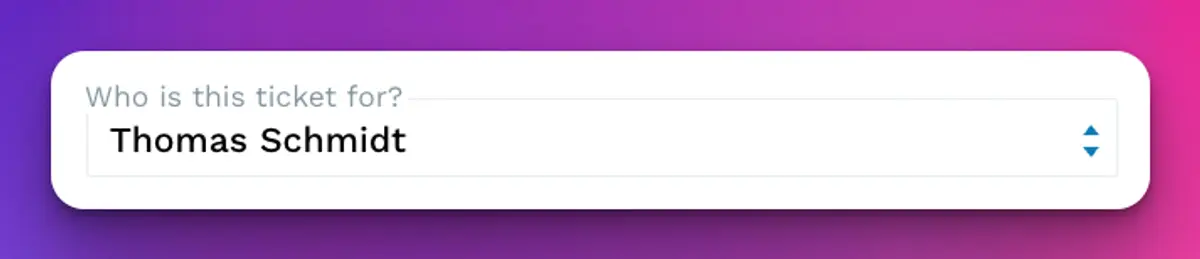
Choosing someone else asks for their name, an email if the event collects one, and whether they’re an adult (18+) or a child. That person is added to your contacts and linked to the buyer, so the next time the family books, they’re already in the list.
Do registration questions still need filling in every time?
Mostly not. Per-ticket questions now pre-fill from the attendee’s own contact record, and changes made at checkout update that contact’s profile.
So when Mia’s dietary requirements are already on her record, they turn up on her ticket. If her parent corrects them during checkout, the correction goes back to Mia’s record rather than disappearing into one event’s export. Pre-fill only fills empty answers. It won’t overwrite something the buyer has typed in.
Can a non-member buy a member-only ticket for their child?
Yes, if the child is the member. Eligibility now follows the attendee, not the buyer. Evan isn’t a member, his son Thomas is, and Evan can now buy Thomas the member-only ticket.
This one has been asked for a lot, mostly by clubs whose members are juniors and whose payers are parents. Before, the only way through was for the parent to hold a membership they didn’t need, or for the registrar to add the ticket by hand.
The dropdown only lists people who are eligible for that ticket. If a ticket requires a Senior membership and only one of the kids has one, that’s the only kid who shows.
What happens when nobody in the family is eligible?
The buyer sees a message explaining what the ticket needs, such as a particular membership, and a Get a membership button. That’s the other half of this work, which shipped earlier in July: buyers are sent to the right membership page, and after joining they can go back to event checkout and carry on.
It replaces the old dead end, where someone hit a members-only ticket, went off to join, and then had to find their way back to the event on their own. Some of them didn’t. The early-July release also made sold-out and sales-ended tickets clearer on the event page, so people aren’t left guessing why they can’t book.
What changes for admins?
You get a list of who’s actually coming, not a list of who paid. Where one person bought for several people, each ticket shows its attendee. You can cancel and restore individual tickets, and TidyHQ checks capacity before a restored or added ticket goes back in, with the option to raise the limit if you want to make room.
Both the buyer and every attendee are added to the event’s contact group. When the venue changes because the ground’s closed, the message reaches the parent who booked and the adult attendee who’s driving themselves.
How to set it up
Linking tickets to attendees happens automatically. There’s nothing to switch on. To get the most from it:
- Open the event and go to the ticket settings.
- Tick Collect Attendee Information and add the fields you need under Per Ticket (for example Dietary Requirements or Shirt Size), so they pre-fill from each attendee.
- For member-only tickets, use Requires Membership in the ticket’s settings.
- Set Auto-add Contacts to Group if you want a group for the event’s attendees.
- Save the event.
The steps for per-ticket fields are in the help centre article on collecting ticket holder info.
Limits and caveats
Guest checkout is largely unchanged. The attendee choices come from a signed-in buyer’s linked contacts, so a guest doesn’t get their family list. If your events are mostly bought by members’ parents, it’s worth nudging them to log in first.
The family list is only as good as your links. If a parent’s account isn’t linked to their kids in Contacts, the kids won’t appear, and the parent will end up adding them as someone else. That creates the link going forward, but check for duplicates if the kids were already in your contacts under a different email.
More on how Events and Memberships work together is on the product pages, and the full late-July release notes are on the changelog.
Header image: Mandorla Form by Ellsworth Kelly, via WikiArt

Don't miss these

Sharing policies and files from a peak body to every affiliated club
Peak bodies can share Storage folders with their affiliated clubs, read-only. Folders can now hold links to documents hosted elsewhere, and clubs see shared folders in their sidebar even if they have never added the Storage app.

The new Xero integration splits Stripe payouts by category
Our rebuilt Xero integration is now self-serve on the Pro plan. Each Stripe payout lands in Xero already split across your accounts, so the treasurer can see how much was memberships and how much was the trivia night.

Filter and sort your club's transactions, for the treasurer
Transactions in Finances now has proper filters and sorting. Find every unreconciled canteen deposit, one family's payments or last month's refunds, and export exactly that list to CSV.