

Table of contents
Key takeaways
- Since late August 2026, TidyHQ's Bring Your Own Domain app lets organisations on the Pro plan connect a domain they already own, in most cases without contacting support.
- TidyHQ does not sell domains; the domain must be bought from a registrar, and it stays registered with that registrar after setup.
- The Bring Your Own Domain setup can put a TidyHQ site and email on the main domain or on a subdomain such as members.yourclub.com.au, so an existing website or email provider can be kept.
- To finish setup, a club copies four NS records from TidyHQ into its registrar or DNS host; domains with DNSSEC switched on are set up manually by TidyHQ support.
- After setup, clubs get limited access to manage their own DNS records in Route 53, while the records TidyHQ needs for web and email are protected.
The club bought yourclub.com.au years ago. Someone’s brother-in-law set it up, the renewal goes on the treasurer’s credit card, and it points at a website nobody has updated since the 2019 presentation night. Meanwhile your actual club pages live at yourclub.tidyhq.com and your emails come from an address members do not recognise, so some of them land in junk.
Connecting your own domain to TidyHQ used to mean an email to our support team and a bit of back and forth. In late August we opened up the Bring Your Own Domain app on the Pro plan, which walks you through it yourself in most cases.
What does connecting a custom domain to TidyHQ do?
It lets your TidyHQ web pages show at your own address, and lets emails you send from TidyHQ come from that address too. Members see yourclub.com.au (or members.yourclub.com.au) instead of a tidyhq.com address.
Your default yourclub.tidyhq.com address still exists either way. You can change that subdomain any time under Organisation Settings, then Organisation Details, and that part has nothing to do with this app.
Do I need to buy a domain from TidyHQ?
No, and you cannot. TidyHQ does not sell domains. You buy one from a domain provider such as VentraIP or GoDaddy, and that cost sits outside your TidyHQ subscription. After setup the domain is still registered with your provider. We manage its DNS, not its ownership.
What if we already have a website or email on our domain?
You choose what to keep. The app looks up your domain first and tells you what it found, for example “Your website is hosted with Squarespace” or “You use Microsoft 365 for email”. Then you pick.
For the website there are three options: show your TidyHQ site at your main domain (replacing what is there now), show it on a subdomain such as members.yourclub.com.au, or keep your website exactly where it is.
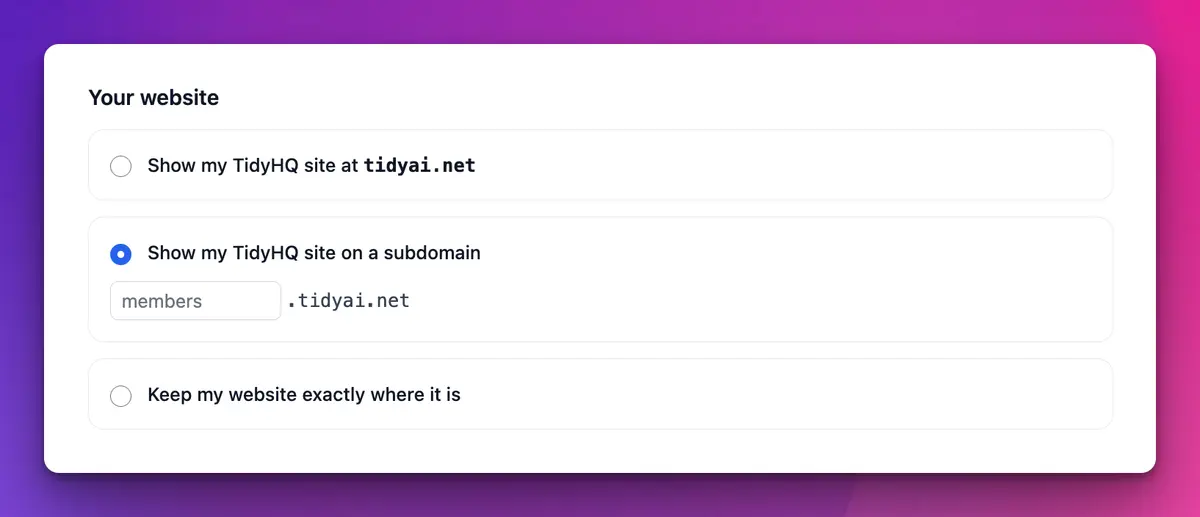
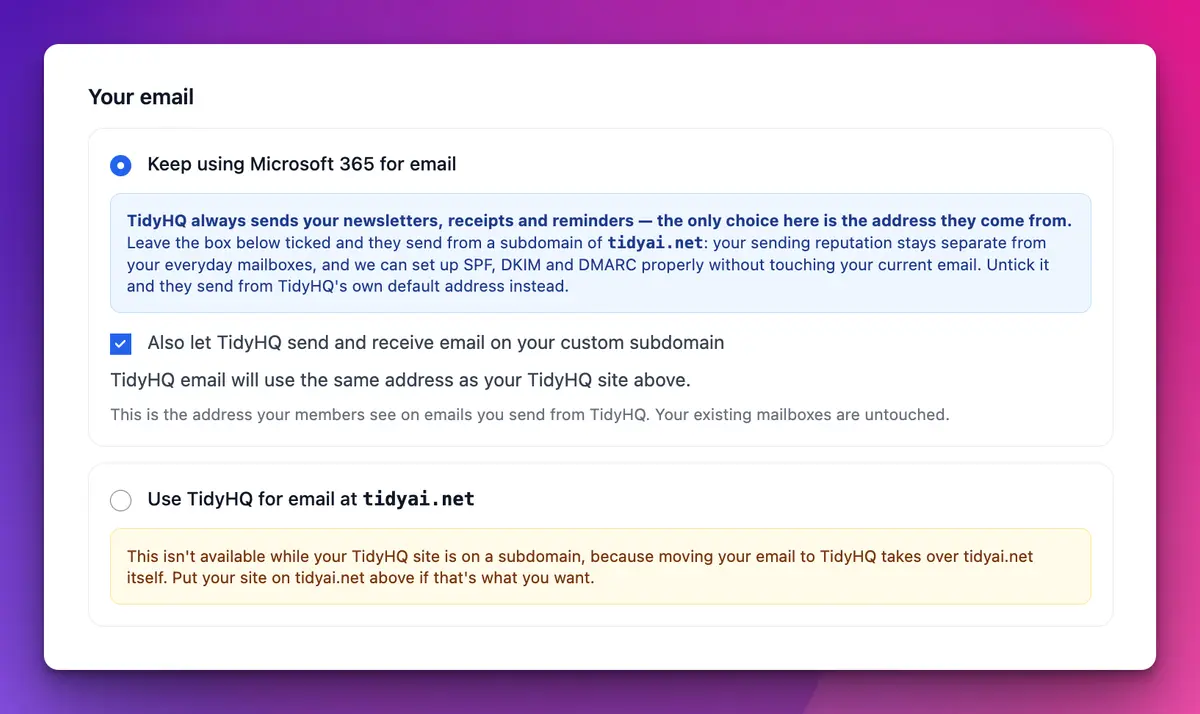
For email, you can keep your current provider and have TidyHQ send and receive on a subdomain, keep your provider and let TidyHQ send from its default address, or move your email to TidyHQ on the main domain. That last one is only available if your TidyHQ site is on the main domain too.
A word of honesty before you move your email across: TidyHQ email is a simple shared inbox. There is no IMAP or POP access, so it will not work in Outlook or Apple Mail. If your president lives in Outlook, keep your current provider and use a subdomain for TidyHQ mail. Try the inbox in Communicate first.
How to set it up
- Go to Apps, find Bring Your Own Domain and click Add App.
- Click Settings, enter just your domain (yourclub.com.au, not https://www.yourclub.com.au) and click Continue.
- Choose what you want for your website and your email.
- Review the DNS records TidyHQ will copy across. The surest way is to export a zone file from your current DNS host and upload it. You can also add records by hand.
- Copy the four NS records TidyHQ gives you into your registrar or DNS host.
TidyHQ checks periodically for the change, so you can close the page and come back. If the nameservers are never changed, the setup eventually expires and nothing on your domain is touched. The custom domain support article has screenshots of every step and a table of which choices go together.
What should I have ready before I start?
A few things. Access to your domain’s DNS settings (or the person who has it). A list of your existing DNS records, ideally as a zone file, because anything you do not copy across will stop working when the nameservers change, including things like Google site verification. And DNSSEC turned off. If your domain uses DNSSEC, the app will say so and our support team will set it up with you instead.
If you are putting TidyHQ on a subdomain, your DNS host needs to support subdomain delegation. Most do, not all. If yours does not, we cannot set up the subdomain option.
The app also flags missing email records. If your domain receives email but has no DMARC or DKIM record, it warns you before you continue, because more of your mail would be treated as spam afterwards.
Can we still edit our own DNS records afterwards?
Yes. Once your domain is set up you get limited access to Route 53, where the DNS now lives, so you can add and edit your own records. The records TidyHQ manages for your web pages and email are protected, since changing them would break your site or email delivery. If you ever want to leave, you can remove or revert the DNS delegation.
Clubs that set up a custom domain with our team between mid-2024 and mid-2026 do not need to do anything. Clubs on the older, pre-2024 setup are on a legacy arrangement; contact support if you are not sure which one you have.
Bring Your Own Domain is on the Pro plan; see pricing for what is included. Your web pages and communications work the same either way, they just come from an address your members recognise.
Header image: Movement Suprematist square by Kazimir Malevich, via WikiArt

Don't miss these

Sharing policies and files from a peak body to every affiliated club
Peak bodies can share Storage folders with their affiliated clubs, read-only. Folders can now hold links to documents hosted elsewhere, and clubs see shared folders in their sidebar even if they have never added the Storage app.

The new Xero integration splits Stripe payouts by category
Our rebuilt Xero integration is now self-serve on the Pro plan. Each Stripe payout lands in Xero already split across your accounts, so the treasurer can see how much was memberships and how much was the trivia night.

Filter and sort your club's transactions, for the treasurer
Transactions in Finances now has proper filters and sorting. Find every unreconciled canteen deposit, one family's payments or last month's refunds, and export exactly that list to CSV.