

Table of contents
Key takeaways
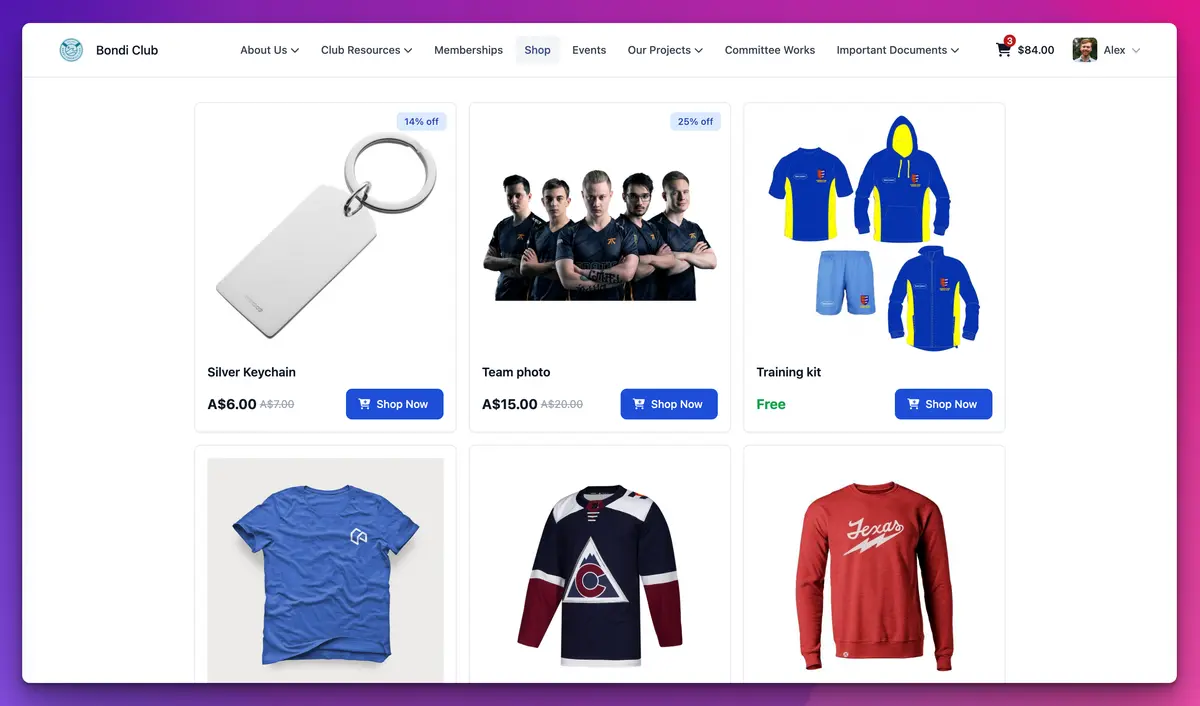
- In April 2026 TidyHQ refreshed its public Shop, with cleaner product cards, a clearer product page and smoother cart updates when items are added or removed.
- The TidyHQ Shop checkout now shows four steps (Cart, Details, Payment, Done) and handles members, guests and signed-in accounts that are not yet connected to the club as separate, clearly labelled states.
- Guests can buy from a TidyHQ club shop by entering their email, first name and last name, and their receipt is sent to that email.
- Since December 2025, public TidyHQ Shop pages include structured product data (name, image, description, price, currency and stock availability) so Google can better understand what a club sells.
- The April 2026 refresh also improved accessibility and SEO on TidyHQ public web pages and turned the mobile menu into a drawer.
The new playing shirts arrived in March. The committee ordered 120, the treasurer wants the money back in the account before the AGM, and the parents who said they’d buy one “for sure” are now asking whether they can just pay cash at the canteen. Part of the problem is that buying online has to feel easy. If the checkout looks shaky on a phone, people put it off, and then they forget.
In April we gave the TidyHQ Shop a proper refresh: cleaner product pages, a checkout that shows people where they are, and a clearer path for anyone who isn’t a member. Your public web pages got a tidy-up at the same time.
What changed in the club shop?
Product cards, the product page and the cart all have a cleaner layout. When someone adds or removes an item, the cart updates smoothly instead of making them wonder whether it worked. Sale items show the discount and the original price side by side, and out-of-stock items say so on the product itself.
None of this needs setting up. Your existing products, prices, variations and stock quantities carry straight over.
What does checkout look like for a member?
A member who is signed in sees a step indicator across the top (Cart, Details, Payment, Done) and a panel that says who they are checking out as, with a “Not you?” link in case the family shares a laptop. Their shipping details come next, then payment by card through Stripe. The order summary sits beside the form on a larger screen, so the total is never hidden below the fold.
Can someone buy without being a member?
Yes. A grandparent who wants a supporter’s cap doesn’t need a membership or an account. They enter their email, first name and last name, and continue as a guest. The checkout labels that clearly (“Continuing as guest”) and sends the receipt to the email they gave. The checkout now treats members, guests and signed-in accounts as separate, obvious states, so nobody is left guessing which boxes apply to them.
That third case matters more than it sounds. If someone has a TidyHQ account from another club but isn’t yet connected to yours, the checkout now tells them plainly and gives them a button to connect before they carry on.
Will my shop items show up in Google Shopping?
Your products now give Google the information it looks for, which makes them easier to find, but Google decides what it shows. Since December 2025, every public product page in a TidyHQ shop includes structured product data: the name, image, description, price, currency, whether it is in stock, and your club’s name as the brand. Products with sizes or colours are described as a group of variants.
A few things help. Only products set to Public can be read by Google, because anything restricted to a group sits behind a sign-in. Write a real description of at least a couple of sentences; very short descriptions get padded with generic text. And keep your stock quantities honest, because “in stock” is part of what gets published.
What changed on the rest of our web pages?
The public web pages were reworked for accessibility and search, with faster loading and better metadata for search engines and link previews. On a phone, the menu now opens as a drawer, which is much easier to use with one thumb while holding a coffee at the ground. Club logos in Facebook link previews also now use an image size large enough to actually appear.
How to set it up
The refresh is already live on your shop. To make the most of it:
- Go to Shop in your admin and open each product you want people to find.
- Check Visible to is set to Public for anything you’d like search engines to see.
- Add a proper description in Details, and at least one square image, 500 pixels or larger.
- Set a Quantity if stock is limited, so sold-out items show correctly.
- Optionally tick Customise Social Sharing Details? to set the title, description and image used when the product is shared on Facebook.
The full field-by-field guide is in the support article on adding a product to your shop.
What it doesn’t do
Payments are by card through Stripe, as before. The shop does not sell on Google directly or list products in Google Merchant Center for you; the structured data just makes your pages easier for Google to read. Orders still sync with Finances and Contacts automatically, so the treasurer can see where the shirt money went.
You can read more about what the TidyHQ Shop and web pages do, or see everything else we shipped in the changelog.
Header image: Untitled Abstraction (Mantic) by Josef Albers, via WikiArt

Don't miss these

Sharing policies and files from a peak body to every affiliated club
Peak bodies can share Storage folders with their affiliated clubs, read-only. Folders can now hold links to documents hosted elsewhere, and clubs see shared folders in their sidebar even if they have never added the Storage app.

The new Xero integration splits Stripe payouts by category
Our rebuilt Xero integration is now self-serve on the Pro plan. Each Stripe payout lands in Xero already split across your accounts, so the treasurer can see how much was memberships and how much was the trivia night.

Filter and sort your club's transactions, for the treasurer
Transactions in Finances now has proper filters and sorting. Find every unreconciled canteen deposit, one family's payments or last month's refunds, and export exactly that list to CSV.