

Table of contents
Key takeaways
- Since July 2026, TidyHQ administrators can archive a contact group instead of deleting it, and the group's contacts and history are kept.
- An archived TidyHQ group can't be chosen for new outbound group messages or bulk contact actions, but email sent to the group's address is still received and forwarded.
- Archived Smart Groups in TidyHQ keep updating their membership automatically from their filter conditions, but the conditions can't be edited until the group is unarchived.
- The Archive Old Groups button at the bottom of Contacts > Groups archives every group that hasn't been updated or had a member added in at least a year, after a confirmation.
- Archived groups appear under an Archived tab in Contacts > Groups and can be brought back with Unarchive Group.
Open the group picker in almost any club that has used TidyHQ for a few years and you’ll find the archaeology. “Committee 2019.” “Clubhouse Working Party.” “U14 Girls 2021”, from a season when there were enough girls for an under-14s. “Trivia Night Volunteers (DO NOT DELETE)”. Nobody wants to delete them, because they’re the only record of who did what. Nobody wants to keep scrolling past them either, especially when the email you’re about to send is going to “Committee 2026” and “Committee 2016” sits right above it.
You can archive a group now. It leaves your everyday lists, and everything in it stays exactly where it was.
What happens when I archive a group?
The group moves out of your active list and gets an Archived tag, but its contacts and history are untouched. Nothing is deleted. The contacts themselves aren’t affected at all; they stay in any other groups they belong to.
What changes is where the group turns up. An archived group can’t be picked for new outbound group messages, and it can’t be used for contact-management actions such as bulk adding or removing contacts. That’s the point. It stops the 2016 committee getting your 2026 AGM notice.
One thing that doesn’t stop: if the group has its own email address, mail sent to it is still received and forwarded as normal. If an old sponsor replies to a years-old thread, you won’t miss it.
How to archive a group
- Go to Contacts > Groups and open the group.
- In the left-hand menu, click Archive Group.
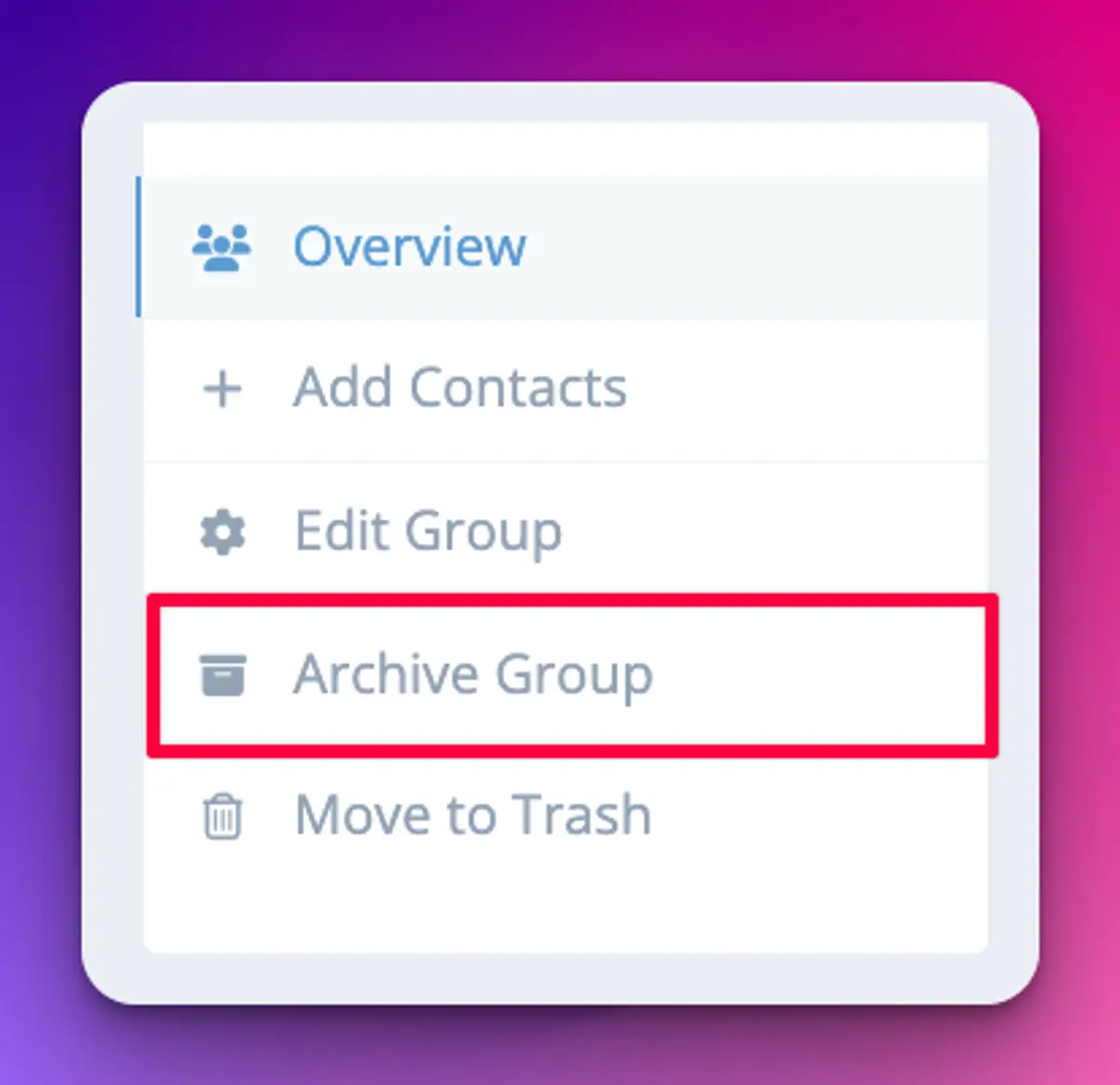
There’s no confirmation step, so check you’re on the right group first. You’ll see a confirmation message and the Archived tag straight away. The support article on archiving groups has screenshots of each step.
Can I archive lots of old groups at once?
Yes. Scroll to the very bottom of Contacts > Groups on the Active tab and click Archive Old Groups. It archives every group that hasn’t been updated in at least a year and hasn’t had a member added in the last year. You’ll be asked to confirm first.
If you have a lot of old groups, you may need to click it more than once to catch them all. For a club that has been on TidyHQ since before the last three presidents, this is the place to start. Do it before the new committee’s first meeting and the handover gets noticeably less confusing.
Where do archived groups go?
They sit under the Archived tab in Contacts > Groups, next to Active. Open one and it’s all there: the contacts, the history, the email address.
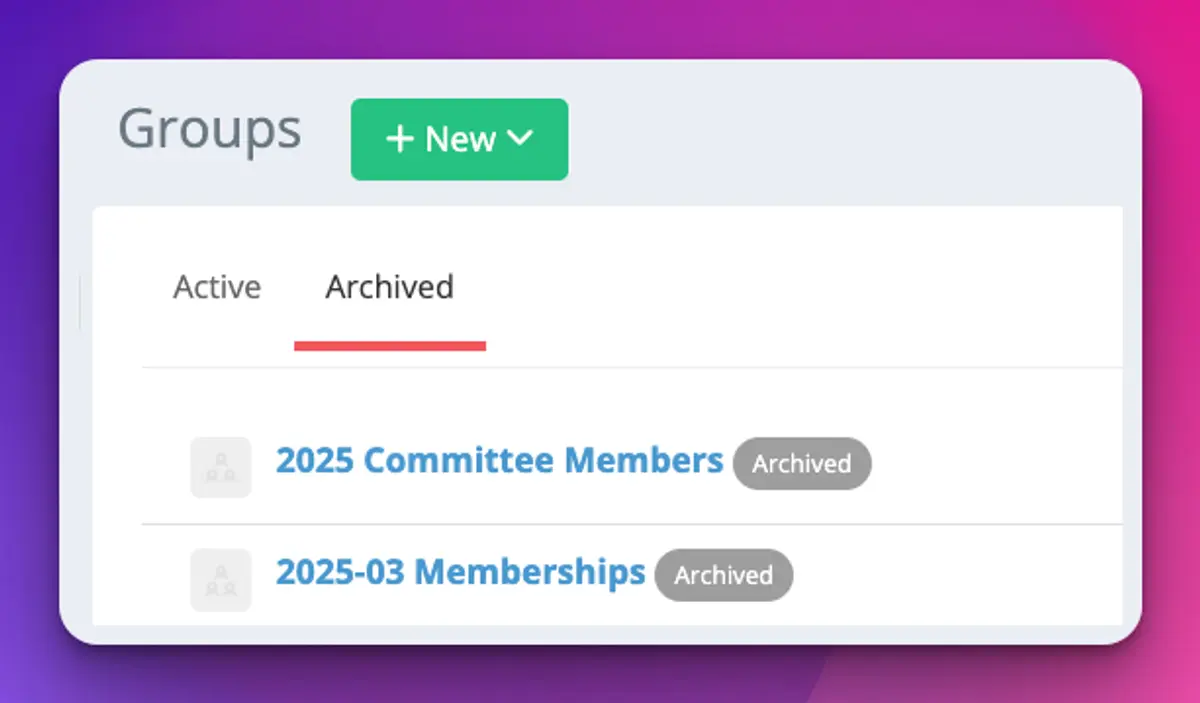
To bring one back, open it from the Archived tab and click Unarchive Group. It returns to your active list with all its contacts.
What about Smart Groups?
You can archive a Smart Group the same way, and it keeps working. A Smart Group’s membership comes from its filter conditions, and those carry on updating in the background while it’s archived. The only thing you can’t do is edit the conditions; unarchive it first if you need to change the rules.
This turns out to be handy. A Smart Group like “Renewed in the last 31 days” is useful for reporting but clutters the list you pick from every day. Archive it and it quietly stays accurate until you want it.
Archived groups also stay usable inside other Smart Groups, so a Smart Group that filters on membership of “Committee 2019” keeps working after that group is archived.
Should I archive or delete?
Archive anything you might want for the record: past committees, old seasons, one-off events, working parties. Use Move to Trash only when you want the group gone. Trashing a group doesn’t delete the contacts in it, just the group itself, but you do lose the record of who was in it.
A reasonable rule for most clubs: if the AGM minutes mention it, archive it.
Anything it doesn’t do?
Archiving is manual, apart from the Archive Old Groups sweep, and that sweep only looks at activity, not at what the group is for. A group you use once a year (say, “Presentation Night”) might look idle and get archived with the rest. Check the Archived tab after a sweep and unarchive anything you still need.
Read more about managing contacts and groups, or see what else shipped in early July in the changelog.
Header image: White by Ellsworth Kelly, via WikiArt

Don't miss these

Sharing policies and files from a peak body to every affiliated club
Peak bodies can share Storage folders with their affiliated clubs, read-only. Folders can now hold links to documents hosted elsewhere, and clubs see shared folders in their sidebar even if they have never added the Storage app.

The new Xero integration splits Stripe payouts by category
Our rebuilt Xero integration is now self-serve on the Pro plan. Each Stripe payout lands in Xero already split across your accounts, so the treasurer can see how much was memberships and how much was the trivia night.

Filter and sort your club's transactions, for the treasurer
Transactions in Finances now has proper filters and sorting. Find every unreconciled canteen deposit, one family's payments or last month's refunds, and export exactly that list to CSV.